Thursday, 13 June 2013

[CWM] Clockworkmod Recovery 6.0.4.3 Galaxy Nexus Jelly Bean [4.3]

ClockWorkMod Recovery
Clockworkmod Recovery 6.0.4.3 Galaxy Nexus Jelly Bean [4.3]
Clockworkmod Recovery 6.0.4.3 Galaxy Nexus Jelly Bean [4.3] gives you more options in the Recovery Mode. Features of Clockworkmod Recovery 6.0.4.3 Galaxy Nexus Jelly Bean [4.3] include Nandroid backup, adb shell, advanced update.zip options (ignore asserts and signature checks), and file browser for choosing update.zips. Clockworkmod Recovery 6.0.4.3 Galaxy Nexus Jelly Bean [4.3] is one of the famous recovery replacements for android and has been used widely on the globe.

Installing Clockworkmod Recovery 6.0.4.3 Galaxy Nexus Jelly Bean [4.3] is necessary if you like changing ROMS and flashing KERNELS as well as other modifications to the phone system. To avoid damaging phone you are advised to make a Nandroid backup in case you experience system failure and your device can't boot as normal or some features and applications don't work well after the modification. Stock Recovery doesn't provide option for Nandroid Backup.

How to Install Clockworkmod Recovery 6.0.4.3 Galaxy Nexus Jelly Bean [4.3]
Preparation: 
  • Download Galaxy Nexus Toolkit and install it.
  • 80% Battery to prevent power loss on the process that can damage your phone.
  • Enable USB Debugging in setting/developer options and then connect your device with USB cable.
Steps:
  • Execute Galaxy Nexus Toolkit
  • Type "no" if you are prompted to check the newer version
  • Select your device type. Download Android System Info in Google Play to check your device type.
  • Type 1 to Install Galaxy Nexus Drivers [skip this if drivers are already installed]
  • Type 6 to Flash Recovery
  • Type 1 to Flash Clockworkmod Touch Recovery
  • Type 'no' to go into Fastboot Mode
  • Your device will restart. Once it goes into Fastboot Mode the process will start automatically. Pay attention to Galaxy Nexus Toolkit to see the process. When the toolkit goes back to main menu, that means the process has finished.
  • You can check CWM by booting into Recovery Mode. Turn off the phone and then hold together volume up + volume down + power button. Use the volume button to scroll among the options. Find Recovery Mode and use power button to confirm. [Picture on the top]
Read more

Rooting Samsung Galaxy Tab 2 7.0 Jelly Bean

Rooted Android
Rooted Samsung Galaxy Tab 2 7.0 Jelly Bean
Rooting Samsung Galaxy Tab 2 7.0 Jelly Bean will give you full access to the phone system. Rooting Samsung Galaxy Tab 2 7.0 Jelly Bean breaks the access limit into the system. Before you root Samsung Galaxy Tab 2 7.0 Jelly Bean you can't see the system drive on any file explorer. You can only see internal sd and external sd. But after rooting Samsung Galaxy Tab 2 7.0 Jelly Bean you can access the system files [picture below] and make some modification e.g. changing the boot animation, fonts, etc. Most of the softwares in the playstore demand root access in order to work well. So rooting Samsung Galaxy Tab 2 7.0 Jelly Bean is necessary.
Android System Folder
Samsung Galaxy Tab 2 7.0 Jelly Bean System Folder
Rooting Samsung Galaxy Tab 2 7.0 Jelly Bean is not so difficult. What you need are a laptop/pc, internet access to download required files, a cup of coffee and a pack of cigarette. Let's continue to Samsung Galaxy Tab 2 7.0 Jelly Bean Rooting  process.

Samsung Galaxy Tab 2 7.0 Jelly Bean Rooting  Preparation:
  • Download Galaxy Tab 2 7.0 Drivers [skip this if it's already installed]
  • Download Clockworkmod Recovery [CWM] and install it on the phone
  • Download cwm-root-gtab2.zip
  • Download Fix-Recovery.zip
Samsung Galaxy Tab 2 7.0 Jelly Bean Rooting Instruction:
Note: You need to have CWM installed already before you proceed to Root Samsung Galaxy Tab 2 7.0 Jelly Bean.
  • Transfer cwm-root-gtab2.zip and Fix-Recovery to your external/internal sd
  • Turn off your phone.
  • Hold Volume Up + Power as it reboots, you can let the keys go when Samsung Galaxy Tab 2 is displayed on screen.
  • Now you are in CWM recovery, choose install zip from sdcard, then choose zip from extenalsd/internal and install 'fix recovery.zip'
  • After it finishes, install 'cwm-root.zip' the same way as installing fix recovery.zip
  • Select Reboot System 
  • On the phone menu you will find new app named 'superuser'. DON'T delete/uninstall that.
  • Try to access system file using any file explorer. 'X-plore' is recomended. Select 'allow' to any access permission that pops up.
  • Congratulations! You have rooted your Samsung Galaxy Tab 2 7.0 Jelly Bean.
superuser
Samsung Galaxy Tab 2 7.0 Jelly Bean Superuser
Read more

Wednesday, 12 June 2013

[CWM] Clockworkmod Recovery Samsung Galaxy Tab 2 7.0

Clockworkmod Recovery
Clockworkmod Recovery Samsung Galaxy Tab 2 7.0
If this is the first time for you to hear Clockworkmod Recovery Samsung Galaxy Tab 2 7.0, Well! Clockworkmod Recovery Samsung Galaxy Tab 2 7.0 is a replacement recovery option for Samsung Galaxy Tab 2 7.0 device, made by Koushik "Koush" Dutta. It is based on the Android 2.1 (Eclair) recovery image. Features in Clockworkmod Recovery Samsung Galaxy Tab 2 7.0 include Nandroid backup, adb shell, advanced update.zip options (ignore asserts and signature checks), and file browser for choosing update.zips.

Installing Clockworkmod Recovery Samsung Galaxy Tab 2 7.0 gives you more options compared to Samsung Galaxy Tab 2 7.0 stock recovery. You can enter Samsung Galaxy Tab 2 7.0 ecovery mode by pressing and holding Volume Up + Power as it reboots, you can let the keys go when Samsung Galaxy Tab 2 is displayed on screen. You can compare the options in your Samsung Galaxy Tab 2 7.0 stock recovery and Clockworkmod Recovery Samsung Galaxy Tab 2 7.0 on the pictures below.
Stock Recovery
Samsung Galaxy Tab 2 7.0 Stock Recovery
CWM Recovery
Clockworkmod Recovery Samsung Galaxy Tab 2 7.0
At last, now you have better understanding about Clockworkmod Recovery Samsung Galaxy Tab 2 7.0. Let's proceed to Clockworkmod Recovery Samsung Galaxy Tab 2 7.0 Installation Instruction.

Clockworkmod Recovery Samsung Galaxy Tab 2 7.0 Preparation:
  • Download Samsung Drivers for Samsung Galaxy Tab 2 7.0 [skip this if drivers are already installed]
  • Download Odin  and extract it
  • Download Clockworkmod Recovery Samsung Galaxy Tab 2 7.0
  • Ensure your Samsung Galaxy Tab 2 7.0 has at least 80% battery charged to prevent unexpected device shutdown (due to battery drain) during firmware installation.
Clockworkmod Recovery Samsung Galaxy Tab 2 7.0 Instruction:
  • Boot into Samsung Galaxy Tab 2 7.0 Download-Mode (Power+Volume Down) and press 'volume up' to continue.
  • Run Odin and Choose “GT-P31XX_ClockworkMod-Recovery_X.X.X.X.tar” as PDA
  • Connect your Samsung Galaxy Tab 2 7.0 to the PC. When the tablet is successfully connected, a message reading "Added!" will appear in Odin's message box. At this point, the ID: COM box will also turn yellow with the corresponding COM port number. 
[Note: In case the Added message fails to appear, then try another USB port. If that does not work then try reinstalling Samsung Galaxy Tab 2 7.0 USB drivers on the computer.]
  • In Odin, enable Auto Reboot option by selecting the checkboxes. Leave the others unchecked.
Odin
  • Verify if step 6 and step 7 are done correctly. Then click the Start button in Odin to begin installation.
  • Once the installation is complete, a PASS message with green background appears in the extreme left box at the top of Odin. Your Samsung Galaxy Tab 2 7.0 will now automatically reboot and soon Samsung logo should appear on the screen. 
Odin
  • Now safely unplug the USB cable from your Samsung Galaxy Tab 2 7.0 to disconnect it from the computer.
  • You can check by entering Samsung Galaxy Tab 2 7.0 Recovery Mode [Volume Up + Power]
Read more

Tuesday, 11 June 2013

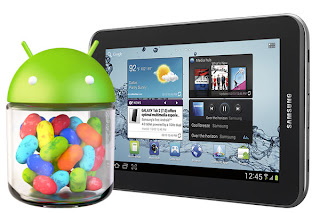
[OFFICIAL] [4.1.2] Jelly Bean Update Samsung Galaxy Tab 2 7.0

Galaxy Tab 2 7.0 Jelly Bean
[4.1.2] Jelly Bean Update Samsung Galaxy Tab 2 7.0 
[4.1.2] Jelly Bean Update Samsung Galaxy Tab 2 7.0  is the latest version of Android after ICS provided by Samsung which offers better and more features than ICS. If you are wondering how to  get [4.1.2] Jelly Bean Update Samsung Galaxy Tab 2 7.0, I would like to share the steps to you. But before that, it is a good idea to look slightly at the new features of [4.1.2] Jelly Bean Update Samsung Galaxy Tab 2 7.0.

Based on Linux kernel 3.0.31, [4.1.2] Jelly Bean Update Samsung Galaxy Tab 2 7.0 was an incremental update with the primary aim of improving the functionality and performance of the user interface. The performance improvement of [4.1.2] Jelly Bean Update Samsung Galaxy Tab 2 7.0 
involves "Project Butter", which uses touch anticipation, triple buffering, extended vsync timing and a fixed frame rate of 60 fps to create a fluid and "buttery-smooth" UI.

A list of [4.1.2] Jelly Bean Update Samsung Galaxy Tab 2 7.0 new features:

  • Smoother user interface: Vsync timing across all drawing and animation done by the Android framework, including application rendering, touch events, screen composition and display refresh
  • Triple buffering in the graphics pipeline
  • Enhanced accessibility
  • Bi-directional text and other language support
  • User-installable keyboard maps
  • Expandable notifications
  • Ability to turn off notifications on an app specific basis
  • Shortcuts and widgets can automatically be re-arranged or re-sized to allow new items to fit on home screens
  • Bluetooth data transfer for Android Beam
  • Offline voice dictation
  • Tablets with smaller screens now use an expanded version of the interface layout and home screen used by phones.
  • Improved voice search
  • Improved camera app
  • Google Wallet
  • High-resolution Google+ contact photos
  • Google Now search application
  • Multichannel audio
  • USB audio (for external sound DACs)
  • Audio chaining (also known as gapless playback)
  • Ability for other launchers to add widgets from the app drawer without requiring root access
  • Lock/home screen rotation support
  • One-finger gestures to expand/collapse notifications
  • New “Select All” button glyph on Swype keyboard
  • Bug fixes and performance enhancements
Feeling excited and can't hold any longer to flash [4.1.2] Jelly Bean Update Samsung Galaxy Tab 2 7.0?  Let's go! Here is the tutorial of flashing [4.1.2] Jelly Bean Update Samsung Galaxy Tab 2 7.0.

" Attention: Do this at your own risk. I will not be responsible if you brick your Samsung Galaxy Tab 2 7.0.   If you follow the steps given correctly, you unlikely break your Samsung Galaxy Tab 2 7.0 . So be careful."

[4.1.2] Jelly Bean Update Samsung Galaxy Tab 2 7.0 Preparation:
  • Download necessary files. Links provided at the bottom.
  • Back up important data and settings on your Samsung Galaxy Tab 2 7.0  including contacts, messages, MMS, photos, videos, APNs and other internet settings to avoid data loss while performing necessary data wiping tasks during or after [4.1.2] Jelly Bean Update Samsung Galaxy Tab 2 7.0 installation.
  • Verify that the correct USB drivers are installed for Samsung Galaxy Tab 2 7.0 on your computer 
  • Enable USB Debugging mode on your Samsung Galaxy Tab 2 7.0 by navigating to Settings > Developer Options.
  • Ensure your Samsung Galaxy Tab 2 7.0 has at least 80% battery charge to prevent unexpected device shutdown (due to battery drain) during firmware installation.
[4.1.2] Jelly Bean Update Samsung Galaxy Tab 2 7.0 Steps:
  • Extract P3100XXCMA4_P3100QLBCMA3_XSE.zip to get a .tar file along with some other files.
  • Extract Odin zip.
  • Switch off your Samsung Galaxy Tab 2 7.0  and then boot it into Download Mode by pressing and holding Volume Down and Power buttons together. Then simultaneously tap Volume Up button to progress into Samsung Galaxy Tab 2 7.0  Download Mode.
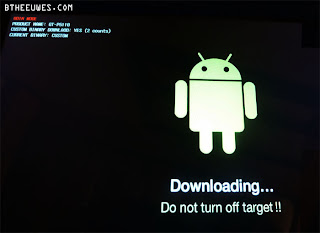
Downloading Mode
Samsung Galaxy Tab 2 7.0 Download Mode

  • Launch Odin on computer as an Administrator and connect your Samsung Galaxy Tab 2 7.0 to the computer via USB cable.
  • When your Samsung Galaxy Tab 2 7.0 is successfully connected, a message reading "Added!" will appear in Odin's message box. At this point, the ID: COM box will also turn yellow with the corresponding COM port number. [Note: In case the Added message fails to appear, then try another USB port. If that does not work then try reinstalling your Samsung Galaxy Tab 2 7.0's USB drivers on the computer again.]
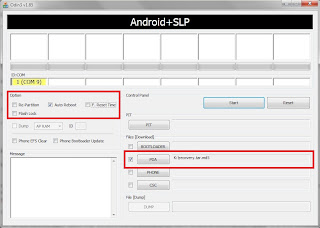
Odid Added
Added
  • Choose the necessary files in the given order from the extracted P3100XXCMA4 folder, using respective checkboxes.
- Choose the PDA checkbox and click the file named '.tar.md5'
- Click the Phone checkbox and select the file named 'Modem'
- Choose the CSC checkbox and click the file named 'CSC'
- Select the PIT checkbox and choose the .pit file

[Note: Ignore the last three steps if such files are not found.]
          • In Odin, enable Auto Reboot and F. Reset Time options by selecting the checkboxes. But, the Re-partition option must be selected only if a .pit file was chosen in the previous step, otherwise ignore it.
          • Verify if step 6 and step 7 are done correctly. Then click the Start button in Odin to begin [4.1.2] Jelly Bean Update Samsung Galaxy Tab 2 7.0 installation.
          • Once [4.1.2] Jelly Bean Update Samsung Galaxy Tab 2 7.0 installation is complete, a PASS message with green background appears in the extreme left box at the top of Odin. The tablet will now automatically reboot and soon the Samsung logo should appear on the screen. Now safely unplug the USB cable from the tablet to disconnect it from the computer.
          Odin Pass
          Pass
          Note: If your Samsung Galaxy Tab 2 7.0 gets stuck at booting animation (after step-9) then return to recovery mode and perform data wiping task by selecting Wipe Data/factory Reset and then select Reboot System Now.
            [4.1.2] Jelly Bean Update Samsung Galaxy Tab 2 7.0 is now installed and running on your Samsung Galaxy Tab 2 7.0. Go to Settings > About Tablet to verify the firmware installed.
            Read more

            Wednesday, 5 June 2013

            Yamicsoft Windows 8 Manager v1.1.1 Full Version

            Yamicsoft Windows 8 Manager v1.1.1 Full Version
            Yamicsoft Windows 8 Manager v1.1.1 Full Version
            I got a cool program to share named Yamicsoft Windows 8 Manager v1.1.1 Full Version which i have been using for a couple of months and found Yamicsoft Windows 8 Manager v1.1.1 Full Version is extremely useful for Windows 8 users. Yamicsoft Windows 8 Manager v1.1.1 Full Version is quite similar to TuneUp Utilities but offers a more complete tweak and customization. After few years ago releasing Windows 7 Manager which was special for Windows 7, Yamicsoft is trying to build the same software for Windows 8. 

            Yamicsoft Windows 8 Manager v1.1.1 Full Version helps you optimize, tweak, repair and clean up Windows 8. Yamicsoft Windows 8 Manager v1.1.1 Full Version will increase your system speed, eliminate system fault, improve system security, and meet all of your expectations. Yamicsoft Windows 8 Manager v1.1.1 Full Version bundles more than 30 different utilities in one and help your system faster and more stable, secure and personal.

            Features and Benefits of Yamicsoft Windows 8 Manager v1.1.1 Full Version

            Yamicsoft Windows 8 Manager v1.1.1 Full Version Information Tab:
            Get detailed system and all hardware information on your system; help you find out the installation key of Windows, Office products; show all detailed information of running processes and threads on your machine; Yamicsoft Windows 8 Manager v1.1.1 Full Version offers 1-clicking Cleaner cleans your system automatically; Repair Center helps you to fix various system problems.
            System Information
            Yamicsoft Windows 8 Manager v1.1.1 Full Version System Information Tab
            Yamicsoft Windows 8 Manager v1.1.1 Full Version Optimizer Tab:
            Tweak your system to improve windows startup and shutdown speed, tweak your hardware to increase system speed and performance; Control what is started on Windows startup, check and repair the advanced starup items to restore the malicious change by viruses; Tune up and optimize system services and Task Schedule, turn off smartly some unnecessary system services and tasks to improve system performance.
            Optimizer
            Yamicsoft Windows 8 Manager v1.1.1 Full Version Optimizer Tab
            System Speed
            Yamicsoft Windows 8 Manager v1.1.1 Full Version System Speed Tab
            Yamicsoft Windows 8 Manager v1.1.1 Full Version Cleaner Tab:
            Find out which files or folders engross your disk space and shown with chart. Yamicsoft Windows 8 Manager v1.1.1 Full Version Smart Uninstaller can fully delete programs from your system without residual files and Registry entries; Find and clean junk files to increase Hard Disk space. 

            Yamicsoft Windows 8 Manager v1.1.1 Full Version Duplicate Files Finder can scan your computer for files with the same size, name and modification time. Yamicsoft Windows 8 Manager v1.1.1 Full Version Registry Cleaner checks and repair incorrectly linked Registry entries.

            Yamicsoft Windows 8 Manager v1.1.1 Full Version Registry Defrag rebuilds and re-indexes your Registry to reduce registry access time and therefore improve application responsiveness. Yamicsoft Windows 8 Manager v1.1.1 Full Version Desktop Cleaner can clean useless icons and files on Desktop easily.
            Cleaner
            Yamicsoft Windows 8 Manager v1.1.1 Full Version Cleaner Tab
            Yamicsoft Windows 8 Manager v1.1.1 Full Version Customization Tab:
            Customize the look of your system by tweaking system Explorer, Desktop, Start Menu, Taskbar and notification area; Create the quick startup items on Taskbar with the Jump List launcher; Tune up Windows 7 boot menu; Edit context menus of mouse Right-Clicking; Edit easily the Win + X menu that shown when right-click on Desktop bottom-left corner or Win + X keyboard shortcut ; Create the shortcut that executed quick on run dialog box. Yamicsoft Windows 8 Manager v1.1.1 Full Version Visual Customizer can change system and file type icons, change the lock screen image automatically.
            Customization
            Yamicsoft Windows 8 Manager v1.1.1 Full Version Customization Tab
            Yamicsoft Windows 8 Manager v1.1.1 Full Version Security Tab:
            Improve system security by tweaking system components, UAC and login settings; Tune up System Restore options; Hide and restrict to access drives and programs; Encrypt/decrypt files, move system folders to safe locations; Undelete the files that accidentally deleted or formatted on disk. Yamicsoft Windows 8 Manager v1.1.1 Full Version Privacy Protector can maintain your personal privacy by eliminating the tracks that you leave behind; Hide, add or delete the Control Panel entries.

            Yamicsoft Windows 8 Manager v1.1.1 Full Version Network Tab:
            Optimize your Internet connection speed, manage all shares items; Tweak your Internet Explorer easily. Yamicsoft Windows 8 Manager v1.1.1 Full Version IP Switcher can switch your IP address easily on different networks; Edits the Hosts file to speed up surfing internet and permit only to access the specified Hosts.

            Yamicsoft Windows 8 Manager v1.1.1 Full Version Misc. Utilities Tab:
            Show the collection of Windows utilities and pin system items to Start Screen and Taskbar; split and merge any files; Automatically back up files regularly using Super Copy. Yamicsoft Windows 8 Manager v1.1.1 Full Version Registry Tools help you to operate Registry easily.
            Repair Center
            Yamicsoft Windows 8 Manager v1.1.1 Full Version Repair Center Tab
            Read more

            Thursday, 21 February 2013

            Connectify Hotspot PRO Full Version - Turn your PC into a WiFi hotspot

            Connectify Hotspot PRO Full Version
            Connectify Hotspot PRO Full Version
            Connectify Hotspot PRO Full Version will turn your laptop into a WiFi hotspot to share the Internet with friends, coworkers, and mobile devices.

            Connectify Hotspot PRO Full Version is running in the Notification Tray. When running in mode "access point", Connectify Hotspot PRO Full Version is a real-WiFi Access Point running on your computer. Any device that can connect to a regular access point, can connect to Connectify Hotspot PRO Full Version connection point, without any configuration or special software required.

            When Connectify Hotspot PRO Full Version is run in "Ad Hoc" set it all for you (Wireless card, Internet sharing, firewall, etc..) by pressing a button. Connectify Hotspot PRO Full Version also provides advanced features like showing you what computers are connected to the network and allow you to right click to explore their shared drives and printers.

            Here are some key features of "Connectify Hotspot PRO Full Version":

            Software-based Wireless Router:
            · Take any Internet connection and share it wirelessly with no additional hardware.

            Connectify Hotspot PRO Full Version connects with mobile devices:
            · It connects easily to any number of WiFi enabled devices to your mobile network.

            Software Access Point
            Transform your laptop into a true access point Wi-Fi Internet connection sharing

            Share Internet from other Wi-Fi networks
            Reissue the Wi-Fi network you're on, as their own insurance Connectify hotspot with your laptop Wi-Fi.

            View computers and devices connected
            Know who and what devices are connected to your Connectify hotspot at all times.

            Simple controls Firewall
            Set permissions for Internet and local network (LAN) access to each connected device.

            Share Wi-Fi from 3G/4G networks
            Share Internet from 3G/4G cards along with a wide variety of other cards USB

            "Fling" drag and drop file transfer
            Easily share files with devices connected to your access point and other computers on the network running Connectify Hotspot PRO Full Version.

            Service Discovery
            Scan all your devices for available shared folders or drives, web servers, iTunes and other remote services.
            Setting Hotspot
            Connectify Hotspot PRO Full Version Setting Tab
            Fully customizable SSID
            Name your hotspot whatever you want

            Repeater Functionality
            Expand the range of your home router or network using the same name and password.

            Selection AutoInternet
            When set to "Automatic," Connectify Hotspot PRO Full Version intelligently chooses which hotspot Internet connection to share and makes the necessary configuration changes to your access point

            Connectify Hotspot PRO Full Version Requirements:

            · A laptop or PC running Microsoft Windows and an adapter card or Wi-Fi support.


            Read more

            Monday, 11 February 2013

            Bitdefender Antivirus 2013 Full - AntiVirus Plus, Total Security, Internet Security, Windows 8 Security

            Bitdefender Antivirus 2013 Full
            Bitdefender Antivirus 2013 Full
            Bitdefender Antivirus 2013 Full is an antivirus software suite developed by Romania-based software company Softwin. Bitdefender Antivirus 2013 Full was launched in November 2001, and is in its 15th build version. The Bitdefender Antivirus 2011 version was launched in August 2010, and Bitdefender Antivirus 2011  includes several protection and performance enhancements such as Search Advisor and Performance Optimizer. The Bitdefender Antivirus 2013 Full version was launched in 25 June 2012.

            The Bitdefender Antivirus 2013 Full roducts feature antivirus and antispyware, personal firewall, privacy control, user control and backup for corporate and home users. PC Tuneup and Performance Optimizer are available in the Bitdefender Antivirus 2013 Full Total Security Suite.


            Bitdefender Antivirus 2013 Full range includes antivirus products for home users and businesses. Bitdefender Antivirus 2013 Full Home editions support Microsoft Windows, Symbian OS, Windows Mobile and Mac OS X; Bitdefender Antivirus 2013 Full business editions support Microsoft Windows, Linux, FreeBSD, Solaris and Mac OS X. The current version of Bitdefender Antivirus 2013 Full Home/Home Office security suite includes antivirus, anti-spyware, firewall, e-mail spam filtering, backup, tune-up and parental control components. A Bitdefender Antivirus 2013 Full free basic online scan is offered via the Bitdefender website. Bitdefender Antivirus 2013 Full free version however does require free registration and is valid for 1 year after registration.


            Unlike Bitdefender Antivirus 2013 Full commercial version, Bitdefender Antivirus 2013 Full free tools only offer an on-demand virus scanning and doesn't provide real time scanning, and may therefore be less suitable for machines with a continuous connection to the internet.


            Read more

            Friday, 25 January 2013

            Kaspersky Antivirus 2013 Full - KAV KIS KMS Pure Password Manager

            Kaspersky 2013
            Kaspersky Antivirus 2013 Full
            Kaspersky Antivirus 2013 Full Lab is a Russian multi-national computer security company, co-founded by Natalia Kaspersky and Eugene Kaspersky in 1997. Kaspersky Antivirus 2013 Full Lab is a developer of secure content and threat management systems and the world’s largest privately held vendor of software security products. The company’s products and technologies provide protection for over 300 million users worldwide and more than 200,000 corporate clients globally.

            Kaspersky Antivirus 2013 Full Lab ranks fourth in the global ranking of antivirus vendors. Kaspersky Antivirus 2013 Full Lab is ranked 4th in Endpoint Security segment according to IDC data for 2010. According to Gartner, Kaspersky Antivirus 2013 Full Lab is currently the third largest vendor of consumer IT security software worldwide and the fifth largest vendor of Enterprise Endpoint Protection. 


            The first product, Kaspersky AntiVirus, was released by Eugene Kaspersky in the middle of 1987. As of 2012, the line of Kaspersky home-user products consists of Kaspersky Internet Security (KIS) 2012, Kaspersky AntiVirus (KAV) 2012, Kaspersky Mobile Security (KMS) 9 and AVZ Antiviral Toolkit, Kaspersky AntiVirus for Mac, Kaspersky Password Manager, and Kaspersky KryptoStorage. In 2010, Kaspersky launched a consumer security suite named Kaspersky Pure. In the United States, Kaspersky Antivirus 2013 Full Lab was ranked as the fastest growing internet security software, based on NPD sales data.

            In addition to the company’s consumer products, Kaspersky Antivirus 2013 Full  Lab offers a variety of security applications designed for small business, corporations and large enterprises. These offerings include security software to protect workstations, file servers, mail servers, mobile devices, and Internet gateways, all managed through a centralized Administration Kit. These applications are also available in bundled Kaspersky Antivirus 2013 Full security suites, scaled to fit the requirements of organizations of varying sizes. 

            The latest line of Kaspersky Antivirus 2013 Full products are certified for Windows 8 and are multi-core optimized.


            Inform Me If The Serials of Kaspersky Antivirus 2013 Full Products Are Not Working Anymore
            Read more

            Tuesday, 15 January 2013

            AVG Antivirus 2013 Full - Free, Paid and Internet Security

            AVG Antivirus 2013 Full
            AVG Antivirus 2013 Full
            AVG Antivirus 2013 Full Technologies provides one of the most popular free antivirus applications available, but since 2006 AVG Antivirus Full has added antispyware, link scanning, safe search, identity theft prevention and other technologies to their repertoire in order to create a complete AVG Antivirus internet security suite. AVG Antivirus 2013 Full software has been tested well with VB100 since 2003, and AVG Antivirus 2013 Full continue to earn awards and certifications from a variety of independent test labs.

            AVG Antivirus 2013 Full Internet Security suite is a complete solution that goes beyond basic security. AVG Antivirus 2013 understands that many users opt for AVG Antivirus 2013 Full free version and that AVG Antivirus 2013 Full need to offer valuable additions to entice them to upgrade to AVG Antivirus 2013 Full paid version. To satisfy paying customers AVG Antivirus 2013 Full provides tools that many other AVG Antivirus 2013 Full products and AVG Antivirus 2013 Full free version do not, such as Facebook protection, website reports, anti-bullying technology to protect your children, a YouTube video accelerator, more frequent updates, system tools and 24/7 support.


            AVG Antivirus 2013 Full Protection

            AVG Antivirus 2013 Full detects malware from all avenues. AVG Antivirus 2013 Full provides protection from viruses and other malware from the internet, optical discs and external drives, email and email attachments, IM links, social media links and file sharing. AVG Antivirus 2013 Full uses signature, polymorphic, heuristic and behavior-based analysis to detect all types of malware, including spyware, adware, Trojans, browser hijackers, phishing scams and rootkits. AVG Antivirus 2013 Full also has a website advisor. This tool, called AVG Antivirus 2013 Full LinkScanner, rates websites listed in search engine results so you can know how safe they are before you visit them. AVG Antivirus 2013 Full LinkScanner works with Google, Yahoo, Bing and other popular search engines. You can also submit suspicious URLs to AVG Antivirus 2013 Full and they will check them for you before you visit the site.

            AVG Antivirus 2013 Full Internet Security suite protects social media interactions. AVG Antivirus 2013 Full Internet Security can scan links posted on Facebook, Twitter or MySpace to check for safety. AVG Antivirus 2013 Full also provides an AVG Antivirus 2013 Full security toolbar specifically for Facebook. These AVG Antivirus 2013 Full 
            tools will not only protect you and your computer from malicious links but also prevent you from sharing bad links with your friends.

            AVG Antivirus 2013 Full Security Features

            AVG Antivirus 2013 Full internet security software includes most of the features you need to protect your computer and keep your AVG Antivirus 2013 Full Security software up-to-date. You can schedule scans and updates, play games uninterrupted, protect your identity, scan USB drives and discs, and it will pause or delay scans when you laptop battery is running low. However, though AVG Antivirus 2013 Full provides parental controls, they are not included with the AVG Antivirus 2013 Full suite. Parental control is an inexpensive AVG Antivirus 2013 Full add-on.

            This AVG Antivirus 2013 Full security suite does not have a secure browser or sandbox. A secure browser is a browser often run in a virtual area separate from your PC. Since the virtual browser does not run on your PC, browsing is safe. A sandbox is a virtual area where you can open a URL. What AVG Antivirus 2013 Full does have is a site advisor and a tool for testing URLs. The AVG Antivirus 2013 Full site advisor provides reports on websites with information such as the number of compromised pages, threats found, server location and the number of social media followers. If you are uncertain of a website's safety, you can copy the URL and submit it to AVG Antivirus 2013 Full for instant verification.


            Serials for AVG Antivirus 2013 Full Paid Version valid until 2018


            8MEH-RXYFD-JUV72-8922R-FTBZ6-QEMBR-ACED
            8MEH-RAJC2-O3P77-KRRQA-H3SLN-REMBR-ACED
            8MEH-RXYFD-JUV72-8922R-FTBZ6-QEMBR-ACED
            8MEH-R2CML-SS7FW-MOXFR-TRU8V-3EMBR-ACED

            8MEH-RNZLL-2Y4QX-79PPA-MRVQG-AEMBR-ACED

            8MEH-RBG6H-9C2PW-G499A-LA9PK-8EMBR-ACED
            8MEH-RF4BZ-FHATO-VRV3A-49KBM-DEMBR-ACED
            8MEH-RS47Y-82HT8-GONVA-BVED7-DEMBR-ACED
            8MEH-R2CML-SS7FW-MOXFR-TVC9T-3EMBR-ACED
            8MEH-RFR8J-PTS8Q-92ATA-O4WHO-JEMBR-ACED
            8MEH-RPDWL-THRLY-O8Z3R-4H3OA-4EMBR-ACED
            8MEH-RCB97-4HRT9-P4RRR-RRFOP-2EMBR-ACED
            8MEH-RW2ZU-29S4F-26QCR-WFZV4-BEMBR-ACED
            8MEH-RREY3-L2LQA-LUMOR-UHNK2-6EMBR-ACED
            8MEH-RPDWL-THRLY-O8Z3R-474SC-4EMBR-ACED
            8MEH-RPTGT-KMOL7-EEEVR-KORKD-LEMBR-ACED
            8MEH-RMXLW-HN44A-BABPA-SBK3B-PEMBR-ACED
            8MEH-RCKOP-BP9KK-YW8EA-6K8TK-SEMBR-ACED
            8MEH-RFR8J-PTS8Q-92ATA-OTV8K-JEMBR-ACED
            8MEH-RCKOP-BP9KK-YW8EA-6XSTN-SEMBR-ACED
            8MEH-RNZLL-2Y4QX-79PPA-MRVQG-AEMBR-ACED


            Download AVG Antivirus 2013 Full Internet Security Serial
            Download AVG Antivirus 2013 Full Mobile Antivirus for Android 

            Inform Me If the Serials of AVG Antivirus 2013 Full Products
             Are not Working Anymore
            Read more

            Friday, 4 January 2013

            Avast! Antivirus 8 Full Version - Free, Pro, Internet Security


            Avast! Antivirus 8 Full Version
            Avast! Antivirus 8 Full Version
            Avast! Antivirus 8 Full Version is an antivirus computer program developed by AVAST Software a.s. (formerly known as ALWIL Software a.s.), a company headquartered in Prague, Czech Republic, with offices in Linz, Austria; Friedrichshafen, Germany; and San Mateo, California.

            The name Avast is an acronym of "Anti-Virus – Advanced Set". The official, and current logo of Avast! Antivirus 8 Full Version is a white orb with the letter 'a' on it and an orange circle around it, sticking out to four directions.

            Avast! Antivirus 8 Full Version software is based on a central scanning engine that is certified by ICSA Labs and West Coast Labs' Checkmark process. Avast! Antivirus 8 Full Version also offers anti-spyware technology, also certified by West Coast Labs' Checkmark process, as well as anti-rootkit and self-protection capabilities.

            Virus Bulletin has multiple times awardedAvast! Antivirus 8 Full Version with its VB100 Award for 100% detection of "in-the-wild" viruses, and also won the Secure Computing Readers' Trust Award. 

            Avast! Antivirus 8 Full Free Version  is the freeware version of Avast! Antivirus 8 Full Version software available to Microsoft Windows, Mac OS X and Linux users, while Avast! Antivirus 8 Full Version Pro is offered to businesses and users who want additional features. Priority updates are delivered automatically using PUSH update technology in Avast! Antivirus 8 Full Version Pro Antivirus. Avast! Antivirus 8 Full Version Pro also has a command line scanner and a script blocker; however, as of Avast! Antivirus Full Version 6, the script blocker is available also to users of Avast! Antivirus 8 Full free Version .

            Avast! Antivirus 8 Full Version Internet Security provides complete antivirus, anti-spyware, antispam, and firewall protection, complemented by Avast! Antivirus 8 Full Version SafeZone™ and new hybrid cloud technologies, for best protection against viruses, spyware, and other types of malware in 2013.

            Avast! Antivirus 8 Full Free Version  Serial valid until December 2013: W68202000H1200A1114-33J49Z8J
            Avast! Antivirus 8 Full Version Pro Serial valid until  2038: W6754380R9978A0910-4TZ59467
            Avast! Antivirus 8 Full Version Internet Security valid until 2014: Select license file option when registering


            Download Avast! Antivirus 8 Full Version and Anti Theft For Android

            Inform me if the serials of Avast! Antivirus 8 Full Version Products are not working anymore.
            Read more
            Related Posts Plugin for WordPress, Blogger...